Home WiFi vs. Pocket WiFi: What's the Difference and Which Should You Choose?
September 7, 2026
Quick Answer
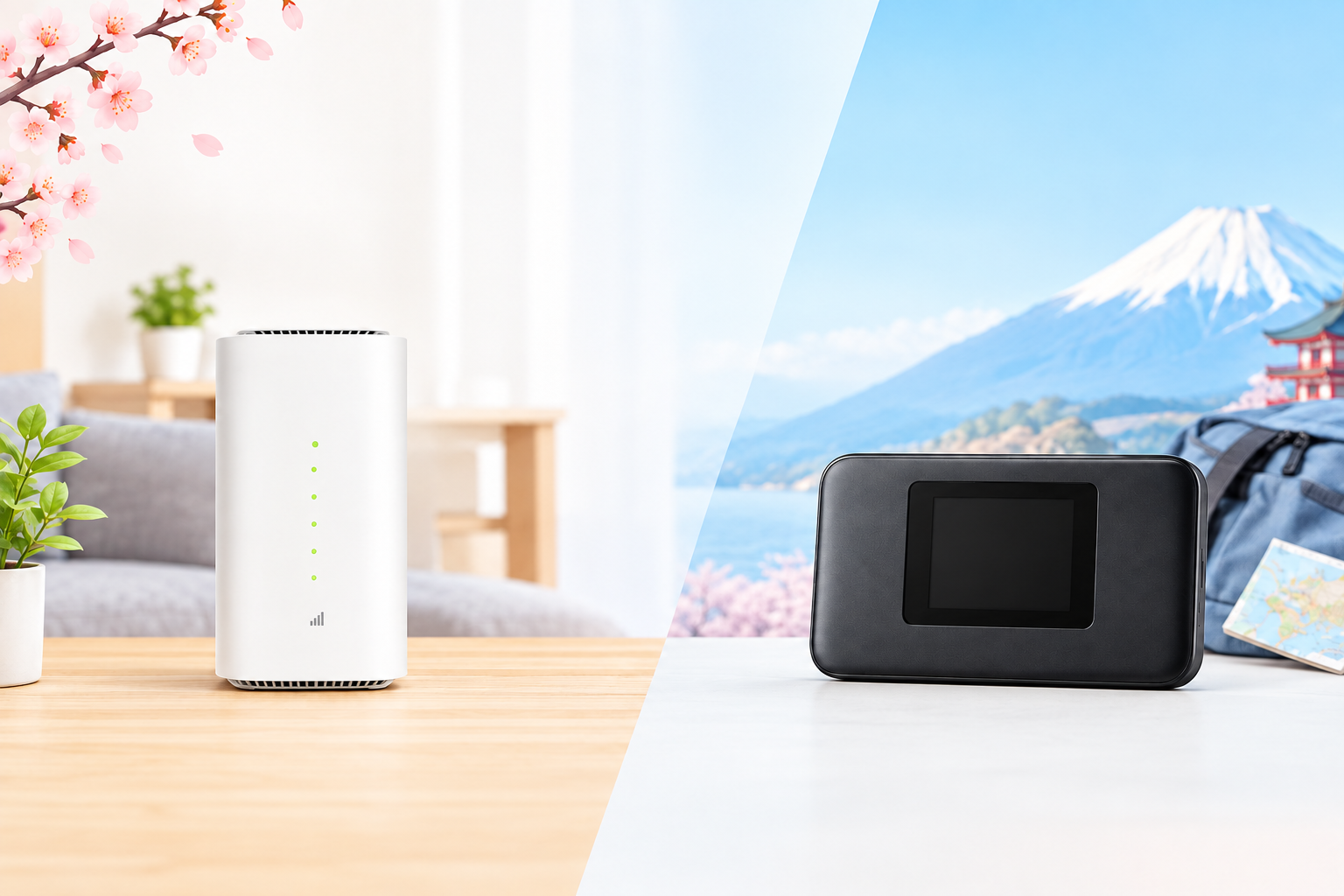
Home WiFi (ホームルーター) is a plug-in router designed for fixed use at a registered address; it has no battery and cannot be taken outside. Pocket WiFi (モバイルルーター) is a battery-powered, pocket-sized router that you can take anywhere within network coverage. Both run on 4G/5G mobile signals, meaning they require no line installation or landlord permission.
In short: if you only need internet at home, have multiple users or devices connecting simultaneously, stream 4K movies, and join daily video calls, Home WiFi is the better fit. If you frequently commute to work or school, move often, live in shared housing, or are only staying in Japan for a few months, Pocket WiFi is far more flexible and budget-friendly.
Who This Guide Is For
This article is written for foreigners living in Japan who need an internet solution for their accommodation, specifically:
- Newly arrived international students staying in dorms or private rentals who are unsure how to set up internet.
- Technical interns or Specified Skilled Workers sharing company housing (2–4 people) looking to split network costs.
- Working professionals who frequently relocate due to changing job sites or project-based assignments.
- Short-term residents (3 months to 1 year) who want to avoid signing a 2-year fiber-optic contract.
- Current data SIM users who run out of high-speed data quickly and want a shared WiFi connection for their phone, laptop, and TV.
If you are deciding between a data SIM and WiFi, check our FAQ section at the end of this guide for a dedicated breakdown.
When These Options Are NOT Suitable
This guide is not relevant if:
- You need a fiber-optic connection (光回線 - hikari). Fiber-optic internet brings a physical cable directly into your home, offering the highest speeds and stability. However, it requires drilling/installation, landlord approval, and a 2-week to 2-month wait time. Neither Home WiFi nor Pocket WiFi is a fiber-optic connection.
- You are a competitive gamer playing online fighting games or fast-paced FPS titles. Both types of wireless routers have higher latency (ping) than fiber-optic and are prone to jitter during peak hours.
- You require a static IP, port forwarding, or self-hosted home servers. Mobile routers typically assign shared private IPs and do not support port forwarding.
- You only need internet access on your phone. In this case, a monthly data SIM or a monthly eSIM will be much cheaper and more convenient.
- You live in an area with poor cell coverage. In mountainous regions, basements, reinforced concrete buildings, or remote industrial zones, 4G/5G signals may be unreliable. Always verify network coverage using your postal code with the provider before signing up.
What Are the Differences Between Home WiFi and Pocket WiFi?
Here is a quick side-by-side comparison. The pricing and speed metrics represent standard market rates in Japan at the time of verification and are for reference only; actual details vary by provider and plan.
| Feature | Home WiFi (ホームルーター) | Pocket WiFi (モバイルルーター) |
|---|---|---|
| Form Factor | Vertical desktop unit, about the size of a thermos, weighing 500g–1kg | Pocket-sized like a smartphone, weighing 100–200g |
| Power Source | Continuously plugged into an AC outlet, no internal battery | Rechargeable battery, lasts 6–12 hours depending on the model |
| Portability | No. Bound to your registered address; taking it elsewhere may violate your contract | Yes. Carry it to work, school, or trips across Japan |
| Device Capacity | Typically 30–60 devices | Typically 10–16 devices |
| Real-World Speed | Faster, equipped with larger high-gain antennas for superior reception | Adequate for web browsing, streaming YouTube, and Zoom calls |
| Coverage Range | Covers an entire 1LDK–2LDK apartment | Best within a radius of a few meters |
| Installation | None required, simply plug and play | None required |
| Reference Monthly Cost | Around 4,000–6,000 JPY | Around 3,000–5,000 JPY |
| Contract Terms | Typically requires a 2- to 3-year commitment with device installment payments | Available with monthly billing and flexible cancellation options |
| Relocation | Must submit an address change request to the carrier | Just pack it up and bring it along |
Important Similarities
Many people mistakenly assume Home WiFi is a "wired connection." It is not. Both devices connect to carrier 4G/5G cellular signals and broadcast local WiFi. As a result, both share the following traits:
- No drilling into walls or waiting around for an installation technician.
- Performance depends directly on signal quality where the device is placed.
- Speeds may slow down during peak evening hours (8:00 PM – 12:00 AM) or after exceeding data caps.
- Higher ping times compared to fiber optics, making them less than ideal for competitive online shooters.
The Biggest Difference: Registered Address Restrictions
This is where many foreigners run into trouble. With Home WiFi, providers strictly stipulate that the unit may only be operated at the contracted service address. If you bring it to a friend's place, take it with you on a trip, or move without updating your address, the connection may be locked or your account flagged for contract violation. Pocket WiFi carries no such restriction; you can use it anywhere within the carrier's coverage area.
Step-by-Step Guide: Choosing and Registering
- Determine the length of your stay in Japan. Staying under a year or uncertain? Prioritize a month-to-month plan with flexible cancellation. Staying over two years at a permanent address? Home WiFi or fiber-optic becomes a viable choice.
- Count the number of users and devices. Living alone with 2–3 devices? A Pocket WiFi is plenty. Living with 3–4 housemates, each with a smartphone and laptop? Opt for Home WiFi or fiber-optic.
- Estimate your monthly data usage. Social media, messaging, and light online study: 30–50GB. Nightly YouTube/Netflix streaming and daily video calls home: 100GB or more—choose an unlimited or high-cap plan.
- Check network coverage at your address. Consult the provider using your postal code (〒), or ask neighbors in your building which carrier they use and how their reception is.
- Inquire closely about contract terms. Always clarify four points: contract duration, early termination fees, whether the router is rented or on installment purchase, and whether the hardware must be returned upon cancellation.
- Prepare your documents and apply. Apply online, at an official carrier store, or through an agency offering support in your language.
- Receive and activate your device. For Home WiFi: plug it into an outlet, wait for the LED indicator to turn green, find the network name, and enter the password printed on the bottom. For Pocket WiFi: charge it, power it on, and connect your devices the same way.
- Optimize device placement. Set it up near a window, elevated off the ground, away from thick concrete walls and microwave ovens. Moving the router just 1–2 meters can drastically improve speed.
- Test your connection speed during the first 7 days. If it runs too slowly, contact your provider right away. Many services allow cancellation during this initial window under Japanese consumer protection regulations.
Required Documents
Whether you choose Home WiFi or Pocket WiFi, the registration requirements are essentially identical:
- Residence Card (在留カード): Must be valid and is mandatory. If your card expires before the contract term ends, your application may be rejected or restricted to short-term terms.
- Passport: Required by certain service providers as secondary ID.
- Current Proof of Address: Must match the official address registered on the back of your Residence Card. For Home WiFi, this will be your designated usage location.
- Payment Method: A Japanese credit card, debit card, bank transfer, or automated bank account deduction (口座振替). Cash is rarely accepted.
- Japanese Contact Phone Number: Needed to receive SMS verification codes and delivery notifications.
- Personal Seal (印鑑 - inkan): Generally no longer required, though some physical storefronts might still request one.
If you do not yet have a Japanese bank account or credit card, look for providers that accept convenience store payments or flexible alternative methods. Check our support page for a list of accepted payment channels.
Costs Breakdown
The table below highlights typical costs across the Japanese market for comparison purposes. Final prices vary by provider, ongoing promotions, and contract terms.
| Fee Category | Home WiFi | Pocket WiFi | Fiber-Optic (for comparison) |
|---|---|---|---|
| Initial / Admin Fee | Around 3,300 JPY | 0 – 3,300 JPY | Around 3,300 JPY |
| Installation Fee | None | None | Around 20,000 – 40,000 JPY |
| Monthly Plan Fee | Around 4,000 – 6,000 JPY | Around 3,000 – 5,000 JPY | Around 4,000 – 6,000 JPY (varies for apartments vs. houses) |
| Device Cost | 24–36 month installments or free loaner | Usually loaned; returned upon cancellation | Modem/ONU is usually provided on loan |
| Early Termination Fee | 0 – 10,000 JPY depending on contract, plus remaining device balance | 0 – 10,000 JPY depending on contract | Can be high, plus line removal charges |
| Loss/Damage Penalty | 15,000 – 30,000 JPY | 10,000 – 25,000 JPY | — |
Pro Tip for Calculating True Cost: Never look at the monthly fee alone. Calculate your real expense using this formula: (monthly rate × number of months you will actually stay) + initial fee + remaining hardware balance + cancellation fee. Many plans advertise "0 JPY for the first month" but lock you into a 36-month hardware repayment schedule; if you leave Japan after 10 months, you will end up paying significantly more than you would on a flexible monthly plan.
The monthly pocket WiFi plan from HD TELECOM is billed on a month-to-month basis, making it an ideal choice for residents unsure of their long-term stay. You can check specific pricing and data quotas on the product page.
Processing Times and Timelines
- Pocket WiFi: Online applications are typically approved within 1 business day, with shipping taking 1–3 days. In-store pickup often allows for same-day activation.
- Home WiFi: Verification takes 1–2 days, with router delivery taking 3–7 days. No technician visits are necessary.
- Fiber-Optic: 2 weeks to 2 months. During March and April—the peak moving season in Japan—wait times can extend up to 2–3 months.
- Contract Term: Month-to-month plans renew automatically each month; cancellation requests must be submitted before the designated cutoff date (usually towards the end of the month). Long-term plans typically carry a 24- to 36-month lock-in period.
- Penalty-Free Cancellation Windows: Fixed-term contracts usually designate a specific "renewal month" (更新月). Mark this window on your calendar to avoid unexpected fees.
Japan enforces the Initial Contract Cancellation System (初期契約解除制度), regulated by the Ministry of Internal Affairs and Communications (MIC), which lets consumers cancel certain telecom contracts within an initial trial period without standard penalties. Eligibility conditions vary by service type, so be sure to confirm the exact policy with your carrier before signing.
Where to Apply
- Major Carrier Stores (docomo, SoftBank, au/UQ, Rakuten): Extensive options, but customer service is primarily in Japanese, with rigid multi-year commitments and complicated fine print.
- Electronics Retailers (Yodobashi, Bic Camera, Yamada): Often run aggressive cashback promotions, but these frequently require enrolling in bundled services and strict multi-year terms.
- Expat-Focused Providers: Multilingual support, streamlined paperwork, and flexible payment methods. HD TELECOM operates a physical location in Shin-Okubo, Tokyo and supports online applications with nationwide doorstep delivery across Japan.
- Online Registration: The quickest route with zero waiting in line. Explore all available options on our products page.
Common Mistakes to Avoid
1. Operating Home WiFi Outside Your Registered Address
This is the single most common misstep. Many assume that "WiFi is just WiFi" and take the device to a friend's place or a new dorm room. The result: the router loses connectivity entirely, or your account receives a compliance warning from the carrier. If you require portability, choose Pocket WiFi from day one.
2. Relocating Without Submitting an Address Change
When moving apartments, Home WiFi users must formally file an address update with their provider. Forgetting to do so will cause the network to shut down at your new location. This administrative hassle is why frequent movers prefer Pocket WiFi.
3. Signing a 3-Year Contract and Leaving Japan After 8 Months
Countless students and technical trainees fall into this trap. Early termination penalties combined with the outstanding hardware balance can easily run tens of thousands of yen. Always confirm the minimum contract length and early cancellation fees up front.
4. Leaving Japan Without Formally Canceling Your Account
Telecom contracts do not automatically lapse when you depart the country. Monthly fees will continue to accrue, unpaid debts will accumulate, and this can lead to serious complications or visa denials if you return to Japan in the future. Always submit a formal cancellation request and return any leased hardware.
5. Shoving the Router into a Corner, Against Walls, or Under Desks
4G/5G cellular waves are heavily degraded by concrete barriers and metallic surfaces. Elevating your unit to chest height near a window can double your download speeds at zero additional cost.
6. Exceeding Fair-Use Thresholds and Assuming Hardware Malfunction
Many "unlimited" mobile plans apply temporary speed throttling if you exceed short-term bandwidth thresholds (e.g., within a rolling 3-day window or monthly cap). Once exceeded, your speeds will drop dramatically for a set period. Clarify these fair-use thresholds before subscribing.
7. Sharing a Single Pocket WiFi Between 4 People
While a Pocket WiFi theoretically supports 10–16 simultaneous connections, having four roommates streaming video simultaneously during peak evening hours will result in severe lag. In shared living arrangements, opt for Home WiFi or a fiber-optic plan; splitting the monthly cost works out to only around 1,000–1,500 JPY per person.
8. Forgetting to Recharge the Pocket WiFi
It sounds obvious, but users forget all the time. Typical battery runtimes range from 6 to 12 hours. If you rely on internet connectivity on the move all day, make sure to keep a portable power bank on hand.
Frequently Asked Questions
Is Home WiFi the same as fiber-optic internet?
No. Home WiFi relies entirely on 4G/5G mobile signals and simply requires a wall socket for power. Fiber-optic brings a physical optical line into your residence and requires manual installation. Fiber provides faster and more consistent speeds, but involves longer setup times and more rigid cancellation policies.
Can Pocket WiFi be used on trains and buses?
Yes, provided you remain within network coverage. This portability is the primary advantage of Pocket WiFi over Home WiFi. Note that signal reception may drop in deep subway tunnels or remote mountain passes.
I live alone. Which one should I choose?
If you are frequently out of the house for work or study, choose Pocket WiFi. If you spend most of your time at home attending online classes, working remotely, and streaming media, Home WiFi delivers a more stable and robust experience.
Do I need a Japanese credit card to sign up?
Major domestic carriers usually require a Japanese credit card or bank account. Expat-focused agencies, however, provide alternative payment channels. Read our support page for a full list of accepted payment solutions.
If I have a WiFi device, do I still need a phone SIM?
Yes. WiFi routers solely provide data access; they do not come with a Japanese phone number (070/080/090). A domestic phone number is mandatory in Japan for employment, apartment leases, opening bank accounts, and signing up for essential mobile apps. We recommend pairing your router with a voice & data SIM, or at least maintaining a secondary data SIM as a backup if your WiFi battery runs out.
Are there annual prepaid WiFi plans available?
For SIM cards, you can purchase a 12-month prepaid plan, which is convenient for students wanting to settle their bill in a single lump sum. For portable WiFi devices, monthly plans remain the standard model; check our monthly pocket WiFi lineup for options.
What connection speed is considered sufficient?
Around 10–20 Mbps is plenty for clear Zoom video calls, streaming 1080p YouTube videos, and attending virtual lectures. For 4K streaming or multi-device households, you will want 50 Mbps or higher. Both Home WiFi and Pocket WiFi easily reach these targets under favorable network conditions.
Do I have to return the equipment upon canceling the service?
It depends on your contract type. If the unit was issued as a rental or loaner, it must be returned intact with the original packaging, power adapter, and cables; missing components often incur replacement penalties. If you purchased the router through an installment plan, the device is yours to keep, but you must pay off any remaining hardware balance.
What if I just arrived in Japan and don't have a permanent address yet?
In this situation, start with a data SIM or an eSIM to get online immediately upon arrival. Once you settle into your permanent apartment and register your address, you can apply for a WiFi router. Home WiFi applications cannot be approved without a verified, registered residence.
Reference Sources
- Ministry of Internal Affairs and Communications (総務省 - MIC): Information on telecommunications service contracts and the Initial Contract Cancellation System (初期契約解除制度): soumu.go.jp
- National Consumer Affairs Center of Japan (国民生活センター): Consumer advisories regarding mobile broadband and internet contract disputes: kokusen.go.jp
- Official carrier service pages for home router and mobile router products: docomo.ne.jp, softbank.jp, uqwimax.jp, rakuten.co.jp
- HD TELECOM product catalogs and official tariff tables on our products page.
Please Note: Monthly rates, minimum contract periods, and cancellation fees are determined independently by each provider and undergo frequent revisions. Before signing any contract, carefully read the mandatory disclosure terms (重要事項説明書) and verify all details directly with the carrier.
Source Verification Date
The informational content and reference pricing in this guide were last verified on June 10, 2025. We audit our guides regularly; if you notice any outdated information, please let our support team know so we can update the article promptly.
Need Help Finding the Right Plan for Your Situation?
If you are still unsure which setup is best for your lifestyle, reach out to HD TELECOM with three quick details: how long you plan to stay in Japan, how many people will share the connection, and your estimated monthly data usage in GB. Our dedicated support team will recommend the most practical and cost-efficient option—even if it's not a service we sell.
If you know you need internet on the move, explore our monthly pocket WiFi plans. If you only need connectivity for your phone, check our monthly data SIM or monthly eSIM offerings. You can find more helpful advice on navigating life and procedures in Japan on our blog.
Related products
Find your plan with HD TELECOM
SIM, eSIM and Pocket WiFi — genuine quality, clear pricing, 24/7 support.