Paying in Japan: What's the difference between combini, PayPay, cards, and bank transfers?
September 7, 2026
Quick Answer
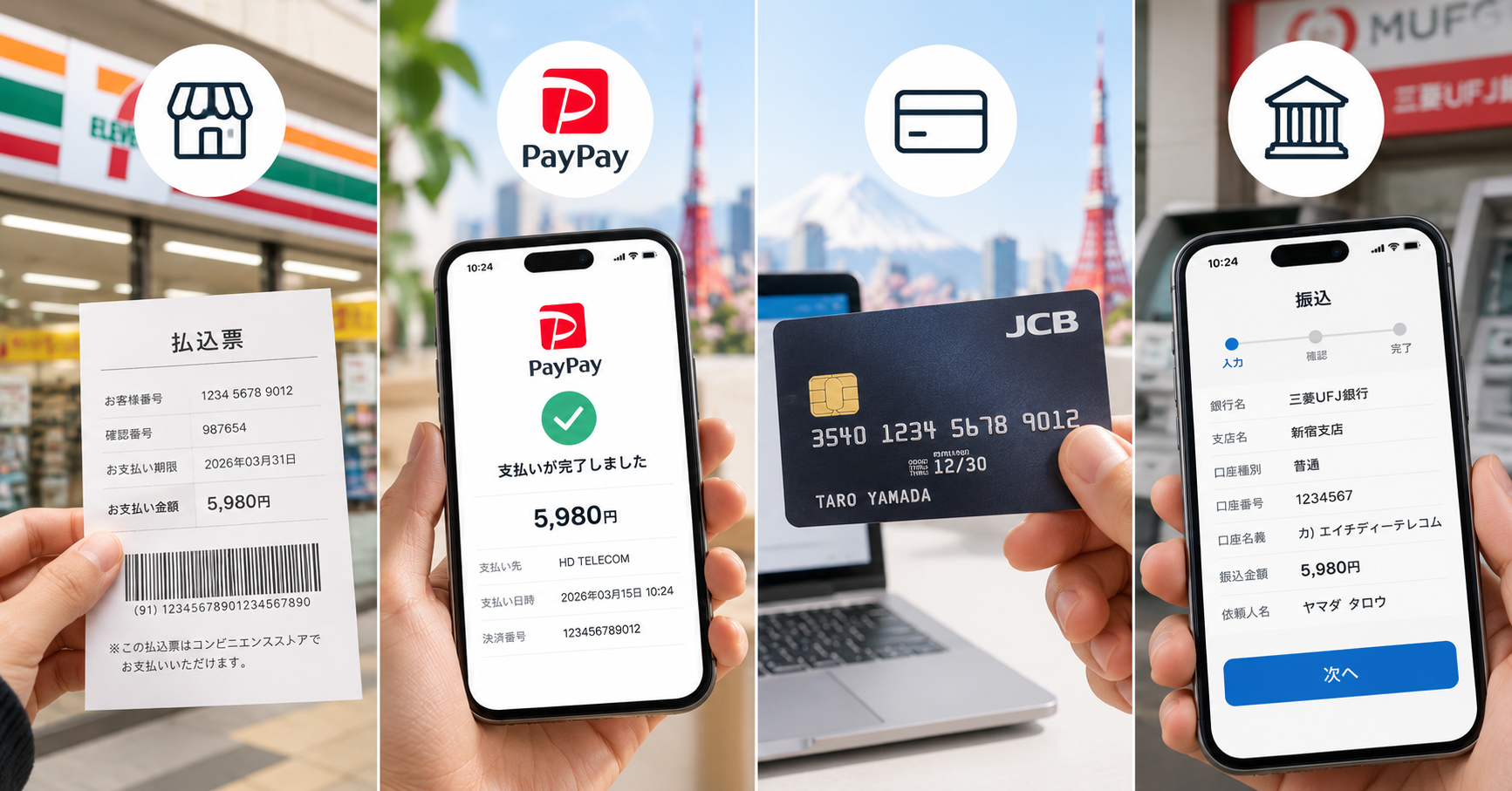
The four common payment methods in Japan differ mainly in fees, processing speed, and what you need on hand. Combini (convenience store payment) is paid in cash at a convenience store, typically costs 0–330 yen in fees, and is processed within a few hours to 1–3 business days. PayPay is paid via e-wallet, is virtually fee-free, and processes instantly, but requires a Japanese phone number. Credit cards are the fastest and have no fees, but foreign cards are sometimes rejected. Bank transfers (振込 furikomi) incur fees of 0–880 yen depending on the bank, take from a few minutes to 1 business day to process, and are prone to delays if the sender's name is entered incorrectly.
If you're new to Japan and don't have a bank card yet: choose combini. If you already have a Japanese bank account and phone number: PayPay is the most convenient and cost-effective. If you need automatic monthly recurring payments: use a credit card.
Who This Guide Is For
This guide is for foreigners living, studying, or working in Japan who are paying for monthly services on their own for the first time—SIM cards, WiFi, electricity, water, rent, and insurance.
- International students newly enrolled who haven't been able to open a bank account or get a credit card yet.
- Technical trainees and Specified Skilled Workers who just arrived with only cash and a Residence Card.
- Working professionals looking for the lowest-fee method to pay recurring bills.
- Anyone purchasing a SIM/eSIM/WiFi and wondering which payment method to select when placing an order.
- Anyone who has made a bank transfer only to be told by the seller that payment "has not been received" and doesn't understand why.
What Is NOT Covered
This guide only covers domestic payments within Japan for standard bills and orders. The following cases fall outside its scope:
- International money transfers to Vietnam or from abroad into Japan—this is 海外送金 (kaigai sōkin), which involves entirely different procedures, fees, and documentation.
- Automatic bank debits (口座振替 kōza furikae)—this is a distinct method requiring paper or online registration with each provider, unlike manual bank transfers.
- Other e-wallets such as LINE Pay, Rakuten Pay, au PAY, and d-Barai (d払い)—they function similarly to PayPay, but specific fees and limits differ.
- Overseas payments made with Japan-issued cards.
- Consumer loans, installments, and credit card revolving payments (リボ払い)—these incur interest and are not covered here.
Step-by-Step Instructions
1. Convenience Store Payment (コンビニ払い - Combini)
- Receive a payment slip 払込票 (haraikomi-hyō) by mail, or receive a payment code via email/SMS from the seller.
- Take the slip (or payment code) to 7-Eleven, FamilyMart, Lawson, Ministop, Daily Yamazaki, etc.
- If you have a paper slip: hand it directly to the cashier to scan the barcode. If you only have a payment code: use kiosk terminals such as Loppi (Lawson/Ministop) or FamiPort/Multi-copy machines (FamilyMart) to print out the slip, then bring it to the register.
- Pay in cash. Receive your stamped receipt stub marked 領収書 (ryōshūsho).
- Keep the receipt for at least 3–6 months. This is your only proof of payment.
2. Paying with PayPay
- Download the PayPay app, register with a Japanese phone number, and verify via SMS code.
- Top up (チャージ) your wallet balance using one of these methods: link a bank account, deposit cash at a 7-Eleven ATM (Seven Bank), or use a PayPay Card.
- When paying online: select PayPay on the checkout screen; the app will open automatically. Check the amount and tap confirm.
- When paying in-store: scan the merchant's QR code, or show your in-app barcode for the cashier to scan.
- Take a screenshot of the transaction history if it is a large payment.
3. Paying with a Credit / Debit Card
- Have your Visa, Mastercard, JCB, or AMEX card ready (depending on accepted cards).
- Enter the card number, expiration date, and the 3-digit security code on the back (セキュリティコード).
- Many merchants require 3D Secure authentication: the system will send an OTP via SMS or your banking app, which you enter to complete the transaction.
- Check your confirmation email. The amount is usually placed on hold immediately, but will only be officially billed on your next statement cycle.
- For monthly services: after the initial payment, the system will automatically charge your card on the same date each month—no further action required.
4. Bank Transfer (振込 furikomi)
- Obtain complete details from the recipient: bank name, branch name (支店名), account type (ordinary 普通 or checking 当座), 7-digit account number, and the account holder's name written in katakana.
- Choose where to transfer: bank ATM, teller counter, or mobile banking app / internet banking (cheapest).
- Enter every detail accurately. The machine will display the account holder's name for verification—if the displayed name does not match what the seller provided, stop immediately.
- In the sender name field (依頼人名 iraininmei), enter exactly what the seller requests—usually your order number or your name in katakana. This is the most frequently overlooked step.
- Confirm, collect the receipt slip (明細票), and keep it.
- If requested by the seller, take a photo of the receipt and send it via Zalo/LINE/email for faster reconciliation.
Required Documents & Eligibility
| Payment Method | What You Need | Not Required |
|---|---|---|
| Combini | Cash, 払込票 payment slip or payment code | No bank account needed, no Japanese phone number needed |
| PayPay | Japanese phone number, smartphone, funding source (linked bank account or cash via 7-Eleven ATM) | Credit card not required |
| Credit card | Valid card, sufficient credit limit, phone number to receive OTP if 3D Secure is enabled | No need to leave home |
| Bank transfer | Japanese bank account (cash card or passbook 通帳), PIN code, recipient details | Credit card not required |
Note on opening a bank account: To open an account in Japan, you generally need your Residence Card (在留カード), a personal seal (印鑑 inkan) at certain banks, proof of address, and sometimes your My Number card. Many banks also restrict services for foreign residents who have been in Japan for less than 6 months. Specific requirements vary by bank—it is best to inquire directly at your local branch.
Fees & Costs
This is the biggest differentiator among the four methods. The amounts below reflect typical rates at the time of source verification and may vary by provider and bank.
| Payment Method | Payer Fee | Notes |
|---|---|---|
| Combini | 0 – 330 yen per transaction | Many companies bundle this fee into the invoice so you don't notice it. Some charge an extra 110–330 yen called a handling fee (収納手数料). |
| PayPay | 0 yen | Free to top up via linked bank account or 7-Eleven ATM. Fees only apply when withdrawing wallet funds back to a bank. |
| Credit card | 0 yen | Unless you opt for installments or revolving payments (分割/リボ), which incur interest. Foreign cards may be charged foreign transaction fees. |
| Transfer within the same bank & branch | 0 – 220 yen | Completely free at many banks. |
| Transfer to another bank via app/internet banking | Approx. 110 – 440 yen | Cheaper than ATMs. Some online banks (Rakuten, SBI, PayPay Bank, etc.) offer several free transfers per month. |
| Transfer at a teller counter | Approx. 660 – 880 yen | Most expensive; best avoided if you can do it yourself at an ATM. |
A money-saving tip: if you make one bank transfer a month and pay a 440-yen fee, that adds up to over 5,000 yen a year—nearly the cost of a full month's data SIM plan. Switching to a credit card or PayPay saves you that entire amount.
Deadlines & Processing Times
How Long Does It Take for Payment to Be Recorded?
- Credit card: Instant, usually within seconds. The fastest option.
- PayPay: Instant, even late at night and on holidays.
- Bank transfer: Most Japanese banks participate in the after-hours clearing system (More Time System モアタイムシステム), so funds usually arrive within minutes, 24/7. However, transfers involving certain smaller institutions or after-hours processing may roll over to the next business day. Transfers made on Friday afternoon, Saturday, Sunday, or public holidays might only be reconciled by the recipient on Monday.
- Combini: The slowest. Data travels from the convenience store to the payment collection agency and then to the seller, typically taking a few hours to 1–3 business days.
Payment Deadlines on Slips
Payment slips (払込票) always display an お支払期限 (payment deadline). Once expired, the barcode is usually invalidated, and convenience store scanners will return an error. You will then have to contact the seller for a replacement slip, and some may charge a reissuance fee.
For credit cards: the money is officially deducted on your card's statement payment date, typically on the 10th, 15th, 26th, or 27th of the following month, depending on the issuer. You spend today, but funds may leave your bank account 40–50 days later—make sure to maintain a sufficient balance on that date, otherwise it will be treated as an overdue payment.
Where to Pay / How to Proceed
Convenience Stores (Combini)
7-Eleven, FamilyMart, Lawson, Ministop, Daily Yamazaki, Seicomart. Open 24/7 with short lines. Not all slips are accepted at all chains—check the logos of accepted stores printed on the back of your slip before heading out.
Bank Transfer
- Your own bank's ATM—moderate fees; many machines offer an English menu.
- Mobile banking app / internet banking—cheapest; can be done at home in the middle of the night.
- Teller counter (窓口 madoguchi)—open only during business hours, usually 9:00–15:00 on weekdays; highest fees, but staff verify details to help prevent errors.
- Japan Post Bank (Yucho) ATM—located at almost all post offices; quite foreigner-friendly.
PayPay and Credit Cards
Handled entirely on your phone or computer without having to go anywhere. If you need to deposit cash into PayPay, use a Seven Bank ATM located inside 7-Eleven stores.
Common Mistakes
Bank Transfer Sent, but the Seller Says "Payment Not Received"
The #1 cause: sender name mismatch. The recipient only sees the katakana text you enter in the 依頼人名 field. If a friend transfers on your behalf, or the app automatically inputs the account holder's name, the seller won't know whose payment it is. Solution: take a photo of the receipt and send it to the seller, clearly stating your order number.
Entering the Wrong Account Number
If the account number does not exist, the money will automatically bounce back after a few days (some banks charge a return fee). If the account exists but belongs to someone else, recovering your money is very troublesome—the bank must contact the recipient to request consent for a reversal. Always verify the recipient's name displayed on the screen before confirming.
Bringing an Expired Combini Slip
The machine will return an error, and the cashier won't be able to accept payment, wasting your trip. Set a reminder 3 days before the deadline.
Attempting to Pay a Combini Slip with a Card or PayPay
Payment slips (払込票) fall under payment collection services (収納代行) and are almost exclusively cash-only. You cannot pay with a credit card, and reward cards or e-wallets are generally not accepted. Be sure to bring enough cash.
Foreign Cards Being Declined
Many Japanese platforms require 3D Secure, but cards issued abroad may send the OTP to an old phone number you no longer use. In other cases, the issuing bank blocks "unusual" foreign transactions. Solution: contact your card issuer, or switch to combini payment or bank transfer.
Expired Credit Card Not Updated
For recurring monthly services, an expired card means the next deduction will fail, and your service could be suspended without your knowledge. When you receive a replacement card, review and update all your automated billing profiles.
Running Out of PayPay Balance Mid-Transaction
PayPay only deducts the exact amount available in your wallet balance (unless you have PayPay Postpay あと払い enabled). If your balance falls short by even a few hundred yen, the transaction will fail. Top up slightly more than needed before making large payments.
Confusing 振込 (Furikomi) with 振替 (Furikae)
振込 (furikomi) means you manually initiate each transfer. 振替 (furikae) authorizes the billing company to deduct payments automatically from your account each month. They are completely different—if you have already set up furikae, do not make manual bank transfers, or you may pay twice.
Frequently Asked Questions
Which payment method is the cheapest?
PayPay and credit cards—both are practically fee-free for the payer. The most expensive option is transferring at a bank teller counter (up to 880 yen per transfer).
How do I pay if I don't have a Japanese bank account yet?
Pay in cash at a convenience store (combini). This is why combini payment remains widely popular with newcomers, despite being slower.
Do bank transfers go through in the evening or on weekends?
Most Japanese banks now support 24/7 transfers thanks to Zengin Net's after-hours clearing system, so funds usually arrive within minutes. However, the recipient may only process and reconcile payments during business hours, meaning your service could be activated on the following business day.
Do I need a credit card to use PayPay?
No, it's not required. You can top up with cash at a 7-Eleven ATM or link a bank account. However, you do need a Japanese phone number to register for a PayPay account.
What should I do if I paid at a combini but the seller hasn't confirmed it?
Wait 1–3 business days. If it still hasn't been confirmed, contact the seller with a photo of your receipt showing the date and time stamp. Do not pay a second time without checking first.
Should I use a debit card or a credit card?
Debit cards deduct funds immediately from your account, making them great for budgeting. Credit cards bill you the following month, which is more convenient for recurring services; however, some Japanese platforms do not accept debit cards for automatic recurring billing.
Will I lose my money if I entered the wrong sender name on a bank transfer?
No, your money is safe—it still goes to the correct recipient account. It just means the recipient won't know who sent it, causing processing delays. Simply send them a photo of the receipt to resolve it.
Should I keep payment receipts?
Yes. Keep them for at least 3–6 months for recurring services, and longer for bills needed for tax filing or proof of residence.
References & Sources
- Japanese Bankers Association (一般社団法人 全国銀行協会) — Information on bank transfer (振込) procedures and fees.
- Japanese Banks' Payment Clearing Network / Zengin Net (一般社団法人 全国銀行資金決済ネットワーク) — Information on the after-hours clearing system (モアタイムシステム More Time System).
- Financial Services Agency of Japan (金融庁) — Consumer guides on financial services and warnings against bank transfer fraud.
- PayPay Corporation — Official guides on registration, wallet top-ups, and transaction limits.
- Payment guides from individual convenience store chains (Seven-Eleven Japan, FamilyMart, Lawson) regarding payment collection services (収納代行).
- HD TELECOM Support page — Payment and bank transfer details applicable to SIM, eSIM, and WiFi orders.
Disclaimer: Fees and policies of individual banks and e-wallets are subject to change at any time. Before making a large transaction, please verify details on your bank's official website or consult branch staff directly. This article is for informational purposes only and does not replace official advice from financial institutions.
Source Verification Date
The information in this article was last verified on May 20, 2025. Banking fees and e-wallet policies in Japan change relatively frequently—if you are reading this well after that date, please cross-check with official sources.
Choosing a Payment Method for Your SIM or WiFi?
HD TELECOM supports multiple payment methods so you can choose the one that fits your situation—even if you just arrived in Japan and don't have a bank account yet.
- No card or bank account yet? Check out our 12-month prepaid data SIM—pay once, use it for a full year, and never worry about monthly payment deadlines.
- Prefer month-to-month flexibility: monthly data SIM or monthly eSIM.
- Need shared internet for multiple devices: monthly pocket WiFi.
Detailed bank transfer information, account details, and available payment methods are updated on our support page. You can also view our full product catalog or read more guides on our blog. If you're still unsure, message HD TELECOM's Vietnamese support team—we are based in Shin-Okubo, Tokyo, and know firsthand the exact hurdles newcomers face.
Related products
Find your plan with HD TELECOM
SIM, eSIM and Pocket WiFi — genuine quality, clear pricing, 24/7 support.